When you update to 1810 below Detailed status for Configuration Manager 1810 below:
How to update in 1810:
\Administration\Overview\Updates and Servicing
right click on "Configuration Manager 1810" then "Install Update Pack"
Warning: don't forget to upgrade sql server native client before if it is not already done:
https://blogs.technet.microsoft.com/arnabm/2018/11/28/sql-server-native-client-update-warning-prerequisite-for-configmgr-1810/
Download
Process update package
[Completed]:Processing update package. Check dmpdownloader.log for details.
Download update package cab file
[Not started]:If your service connection point is online, the update package cab is downloaded. If your service connection point is offline, this step is skipped. Check dmpdownloader.log for details.
Extract update package payload
[Not started]:Extracting update package payload. Check dmpdownloader.log for details.
Download redist
[Not started]:If redistributable files are required and not included with the update, they are downloaded. If files do not need to be downloaded, this step is skipped. Check dmpdownloader.log and ConfigMgrSetup.log for details.
Report Package as downloaded
[Completed]:The update package has been reported as downloaded. Check dmpdownloader.log and hman.log for details.
Replication
Create or update software distribution package
[Completed]:Creating or updating Configuration Manager Update Package. Check hman.log for details.
Update content library
[Completed]:Saving the content into content library on the site server. Check distmgr.log for details.
Prerequisite Check
SQL Server Native Client Version
[Completed]:Verifies that the version of Microsoft SQL Server Native Client installed on the site server meets the minimum requirements to enable TLS 1.2 support.
SQL Server Configuration for site upgrde
[Completed]:Checks if the specified SQL Server meets the minimum requirements for site upgrade.
Potential SQL server performance issue caused by change tracking retention period
[Completed]:Checks if the specified SQL Server meets the minimum requirements for site upgrade.
Administrative rights on site system
[Completed]:Verifies that the logged on user account has administrative rights on the site system computer.
Administrative rights on central administration site
[Completed]:Verifies that the user running Setup has local administrator rights on the central administration site server.
Connection to SQL Server on the central administration site
[Completed]:Checks if the user account running Setup has sysadmin rights on the SQL Server for the CAS.
Check Server Service is running
[Completed]:Check Server Service (LanmanServer) is running.
Domain membership
[Completed]:Verifies that the computer specified for installation is a member of a Windows domain.
Active Directory domain Functional level Check
[Completed]:Verify that the Active Directory domain functional level is Windows Server 2003 or later.
Free disk space on site server
[Completed]:Checks that the site server computer has sufficient available disk space to install the site server.
Pending system restart
[Completed]:Checks if a system restart is pending.
Read-Only Domain Controller
[Completed]:Checking unsupported Read-Only Domain Controller on site server.
Site Server FQDN Length.
[Completed]:Checking Site Server FQDN Length.
Microsoft XML Core Services 6.0 (MSXML60)
[Completed]:Verifies that the Microsoft Core XML Services (MSXML) version 6.0 or later libraries are installed.
Windows Server 2003-based schannel hotfix
[Completed]:Determines if the Windows Server 2003-based schannel hotfix is installed on the site server.
Microsoft Remote Differential Compression (RDC) library registered
[Completed]:Verifies that the Microsoft Remote Differential Compression (RDC) library is registered on the computer specified for Configuration Manager site server installation.
Microsoft Windows Installer
[Completed]:Checking Windows Installer Version >= 4.5.
Existing Configuration Manager server components on site server
[Completed]:Checks if the target site server computer already has existing Configuration Manager server components installed.
Firewall exception for SQL Server
[Completed]:Checks if the Windows Firewall is disabled or if a relevant Windows Firewall exception exists for SQL Server.
Firewall exception for SQL Server (stand-alone primary site)
[Completed]:Checks if the Windows Firewall is disabled or if a relevant Windows Firewall exception exists for SQL Server.
SQL Server service running account.
[Completed]:Check SQL Server service running account.
Dedicated SQL Server instance
[Completed]:Check to see if the selected SQL Server instance is already in use by another Configuration Manager site
Parent/child database collation
[Completed]:Verifies that the site server's database collation matches the database collation of its parent site.
Minimum .NET Framework version for Configuration Manager site server
[Completed]:Verifies that the Microsoft .NET Framework version 3.5 is installed on Configuration Manager central administration site servers, primary site servers, and secondary site servers.
Windows Deployment Tools installed
[Completed]:Checks whether the Windows Deployment Tools component of Windows Assessment and Deployment Kit (ADK) for Windows 10 is installed.
User State Migration Tool (USMT) installed
[Completed]:Checks whether the User State Migration Tool (USMT) component of Windows Assessment and Deployment Kit (ADK) for Windows 10 is installed.
Primary FQDN
[Completed]:Checks if the FQDN provided for the site system uses the primary DNS hostname for the computer.
Site code in use
[Completed]:Checks if the specified site code is already in use by another site in your hierarchy.
Verify Central Administration Site Version
[Completed]:Check the parent Central Administration Site has the same version.
Required SQL Server collation
[Completed]:Verifies that the SQL Server instance and Configuration Manager site database (if present) are configured to use a supported collation.
Backlogged inboxes
[Completed]:Verifies that the site server is processing critical inboxes in a timely fashion, and that inboxes do not contain files older than one day.
Distribution point package version
[Completed]:Verifies that all distribution points in the site have the latest version of software distribution packages.
SQL Server database collation
[Completed]:Verifies that the SQL Server database collation settings of the tempdb database and site database to be upgraded are the same.
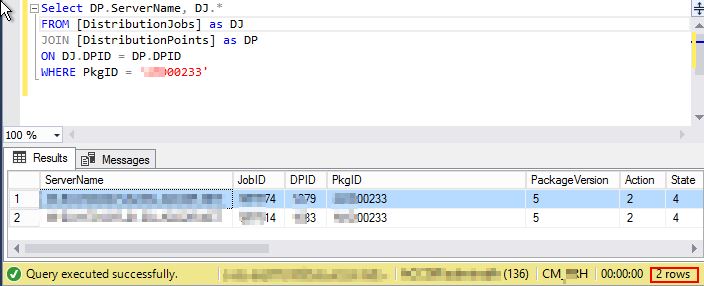
Share Name in Package
[Completed]:Share Name in Package has invalid character: #.
Software update points in NLB Configuration
[Completed]:Verifies that SUM is not using any virtual locations for active SUPs.
Migration active source hierarchy
[Completed]:Verifies that no active source hierarchy is currently configured for migration.
Unsupported upgrade path
[Completed]:Verifies that all site servers in the hierarchy meet the Configuration Manager minimum version that is required for upgrade
Active MP Replica
[Completed]:No Active MP Replica detected
Parent site replication status
[Completed]:Verifies that the replication status of the parent site is Replication Active (corresponds to status=125).
Unsupported system role 'Out of band service point'
[Completed]:Checking that the site system role 'Out of band service point' is not deployed.
System Health Validation site system role is no longer supported
[Completed]:Checking whether the site system role 'System Health Validator' exists in the hierarchy.
Network Access Protection (NAP) is no longer supported
[Completed]:Checking whether there are software updates that are enabled for NAP
Verify database consistency
[Completed]:Pre-requisite rule to verify database consistency
SQL Server sysadmin rights
[Completed]:Verifies that the user account running Configuration Manager Setup has been granted sysadmin SQL Server role permissions on the SQL Server instance selected for site database installation. SQL Server sysadmin role permissions are required in order to create the site database and configure necessary database role and login permissions for Configuration Manager sites.
SQL Server sysadmin rights for reference site
[Completed]:Verifies that the user account running Configuration Manager Setup has been granted sysadmin SQL Server role permissions on the SQL Server instance selected for reference site database installation. SQL Server sysadmin role permissions are required in order to modify the site database.
Site server compute administrative right
[Completed]:Verifies that the site server computer account has administrative rights on the SQL Server and management point.
SQL Server version
[Completed]:Verifies that the version of Microsoft SQL Server installed on the computer selected to host the site database meets the minimum requirements.
SQL Server Edition
[Completed]:Checking the site SQL Server is not Express Edition.
SQL Server Tcp Port
[Completed]:Checking the site SQL Server Tcp is enabled and set to Static port.
Case-insensitive collation on SQL Server
[Completed]:Checks if the SQL Server hosting the Configuration Manager site database is using a case-insensitive collation.
Validate FQDN of SQL Server
[Completed]:Check that the specified FQDN for the SQL Server computer is valid.
Windows Preinstallation Environment installed
[Completed]:Checks whether the Windows Preinstallation Environment component of Windows Assessment and Deployment Kit (ADK) for Windows 10 is installed.
SMS Provider machine has same domain as site server
[Completed]:Checks if SMS Provider machine has same domain as site server.
Custom Client Agent Settings have NAP enabled
[Completed]:Checking whether there are custom Client Agent Settings that enable NAP
Default Client Agent Settings have NAP enabled
[Completed]:Checking whether the default Client Agent Settings enable NAP
SQL availability group configured for readable secondaries
[Completed]:Checking secondary read state of availability group replicas
SQL availability group configured for manual failover
[Completed]:Checking failover state of availability group replicas
SQL availability group replicas on default instance
[Completed]:Checking availability group replicas for instance configuration
SQL Index Create Memory option
[Completed]:Checks if default value is set for SQL Index Create Memory
SQL Server supported version
[Completed]:Starting with version 1702, Configuration Manager does not support SQL Server 2008 R2. https://go.microsoft.com/fwlink/?linkid=841654. This check verifies that the version of Microsoft SQL Server installed on the computer selected to host the site database meets the minimum requirements of SQL Server 2012 with SP2.
Software Update Points using a Load Balancer (NLB/HLB) is no longer supported
[Completed]:Starting with version 1702, Configuration Manager does not support Software Update Points on Loadbalancers (NLB/HLB).
Upgrade Assessment Toolkit is no longer supported
[Completed]:Starting with version 1706, Upgrade Assessment Toolkit is no longer supported. https://go.microsoft.com/fwlink/?linkid=841654
Unsupported site server operating system version for Setup
[Completed]:Verifies that the site server operating system meets the minimum requirement for site server installation. https://go.microsoft.com/fwlink/?linkid=841654
Unsupported operating system version for site system role
[Completed]:Verifies that the site system to be upgraded meets the minimum operating system requirement for site system installation. https://go.microsoft.com/fwlink/?linkid=841654
Using HTTP management point with cloud management gateway is not supported
[Completed]:Checking if HTTP management point is enabled for cloud management gateway
SQL Server Always On availability groups
[Completed]:Checks if the specified SQL Server meets the minimum requirements to host an Always On availability group. https://go.microsoft.com/fwlink/?linkid=873403
Max Text Repl Size for SQL Server Always On availability groups
[Completed]:Checks if the max text repl size for the specified SQL Server is configured properly. https://go.microsoft.com/fwlink/?linkid=873403
Pending configuration item policy updates
[Completed]:Checks if there are many pending configuration item policy updates. https://go.microsoft.com/fwlink/?linkid=2006830
SQL Server Configuration for site upgrade
[Completed]:Checks if the specified SQL Server meets the minimum requirements for site upgrade.
SQL Server Native Client version
[Completed]:Verifies that the version of Microsoft SQL Server Native Client installed on the site server meets the minimum requirements to enable TLS 1.2 support. https://go.microsoft.com/fwlink/?linkid=2026746
Potential SQL server performance issue caused by change tracking retention period
[Completed]:The site database has a backlog of SQL change tracking data. For more information, see https://go.microsoft.com/fwlink/?linkid=2027576
Installation
Check Site Server readiness
[Completed]:Checking if Site Server is ready to apply the update. Check hman.log for details.
Stop CONFIGURATION_MANAGER_UPDATE service
[Completed]:Stopping CONFIGURATION_MANAGER_UPDATE service. Check hman.log for details.
Update CONFIGURATION_MANAGER_UPDATE service
[Completed]:Updating CONFIGURATION_MANAGER_UPDATE service. Check hman.log for details.
Start CONFIGURATION_MANAGER_UPDATE service
[Completed]:Starting CONFIGURATION_MANAGER_UPDATE service. Check hman.log for details.
Extract Update package
[Completed]:Extracting update package from content library on site server. Check cmupdate.log for details.
Validate redistributable
[Completed]:Validating redistributable files. Check cmupdate.log for details.
Check site readiness
[Completed]:Checking if CONFIGURATION_MANAGER_UPDATE service is updated. Check hman.log and cmupdate.log for details.
Check Service Window
[Completed]:Checking if update is allowed to be applied. Check cmupdate.log for details.
Turn off SQL Server Service Broker
[Completed]:Turning off SQL Server Service Broker. Check cmupdate.log for details
Stop ConfigMgr services
[Completed]:Stopping ConfigMgr services. Check cmupdate.log for details.
Unload WMI provider
[Completed]:Unloading WMI provider. Check cmupdate.log for details.
Delete SMSDBMON triggers
[Completed]:Deleting SMSDBMON triggers. Check cmupdate.log for details.
Save site control settings
[Completed]:Saving site control settings. Check cmupdate.log for details.
Upgrade ConfigMgr database
[Completed]:Upgrading ConfigMgr database. Check cmupdate.log for details.
Update SQL registry
[Completed]:Updating SQL Server’s registry. Check cmupdate.log for details.
Update RCM registry
[Completed]:Updating RCM registry. Check cmupdate.log for details.
Install files
[Completed]:Installing files required for the update. Check cmupdate.log for details.
Install language pack
[Completed]:Installing required language pack(s). Check cmupdate.log for details.
Install component
[Completed]:Installing required components. Check cmupdate.log for details.
Install controls
[Completed]:Installing required controls. Check cmupdate.log for details.
Upgrade site control settings
[Completed]:Upgrading site control settings. Check cmupdate.log for details.
Configure SQL Server Service Broker
[Completed]:Configuring SQL Server Service Broker. Check cmupdate.log for details.
Installing ConfigMgr configurations
[Completed]:Installing required ConfigMgr configurations. Check cmupdate.log for details.
Start WMI
[Completed]:Starting WMI provider. Check cmupdate.log for details.
Install services
[Completed]:Installing required services. Check cmupdate.log for details.
Update Sites table
[Completed]:Updating Sites table. Check cmupdate.log for details.
Update Admin Console binaries
[Completed]:Updating Admin Console binaries. Check cmupdate.log for details.
Turn on SQL Server Service Broker
[Completed]:Turning on activation of SQL Server Service Broker queues. Check cmupdate.log for details.
Post Installation
Installing SMS_EXECUTIVE service
[Completed]:Installing SMS_EXECUTIVE service on Site Server. Check sitecomp.log for details.
Installing SMS_DATABASE_NOTIFICATION_MONITOR componen
[Completed]:Installing SMS_DATABASE_NOTIFICATION_MONITOR component on Site Server. Check sitecomp.log and smsexec.log for details.
Installing SMS_HIERARCHY_MANAGER component
[Completed]:Installing SMS_HIERARCHY_MANAGER component on Site Server. Check sitecomp.log and smsexec.log for details.
Installing SMS_REPLICATION_CONFIGURATION_MONITOR component
[Completed]:Installing SMS_REPLICATION_CONFIGURATION_MONITOR component on Site Server. Check sitecomp.log and smsexec.log for details.
Monitoring replication initialization
[Completed]:Monitoring database replication initialization. Check cmupdate.log and rcmctrl.log for details.
Updating Configuration Manager Client Preproduction Package
[Completed]:Updating StagingClient folder used by Configuration Manager Client Preproduction Package. Check hman.log for details.
Updating Client folder on Site Server
[Completed]:Updating Client folder on the Site Server from the installed Configuration Manager Update Package. Check hman.log for details.
Updating Configuration Manager Client Package
[Completed]:Updating Client folder used by Configuration Manager Client Package. Check hman.log for details.
Turning on Features
[Completed]:Turning on Features. Please reopen ConfigMgr Console to see the new features. Check hman.log for details.