Showing posts with label none. Show all posts
Wednesday, November 14, 2018
SCCM 'Client certificate' value set to 'None' can be a Metered Network Connection set to Off
As you can see 'Client certificate' value is set to 'None'. I verified all port connection to MP and delete previous certificate 19c5cf9* in C:\ProgramDate\Microsoft\Crypto\RSA\MachineKeys but always same problem
finally, client log "CcmMessaging.log" permit to help to find solution
Request to http://SRAADEVY01CM101.accor.net/ccm_system/request cannot be fulfilled since use of metered network is not allowed.
Post to http://SRAADEVY01CM101.accor.net/ccm_system/request failed with 0x87d00231.
Request to http://SRAADEVY01CM101.accor.net/ccm_system_windowsauth/request cannot be fulfilled since use of metered network is not allowed.
Post to http://SRAADEVY01CM101.accor.net/ccm_system_windowsauth/request failed with 0x87d00231.
Metered network is a Windows 10 functionnality which permit to limit data in an Internet connection. Cellular data connections are set as metered by default. Wi-Fi and Ethernet network connections can be set to metered but aren't by default
Verification on computer
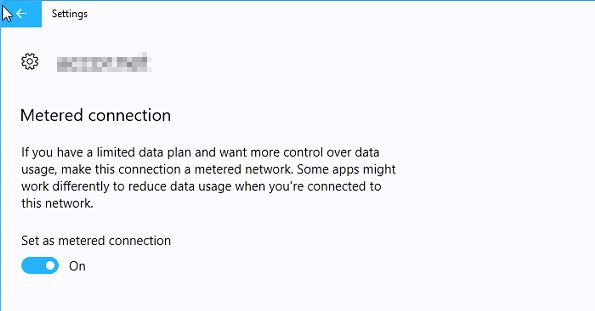
That's the problem:Metered connection is ON (for a desktop workstation what a weird configuration...surely an human mistake)
So change Metered to OFF
In CertificateMaintenance.Log file
Creating Signing Certificate...
Successfully created certifcate
Creating Encryption Certificate...Successfully created certifcate
And now all seems OK
This is the 1st time I see this problem.I suppose this computer has been installed using an offline installation, or SCCM client have been installed after some other configuration. And SCCM registration NOT work and NOT cummunicate if your are on a metered network.
Labels:
0x87d00231,
client certificate,
configmgr,
Configuration Manager,
metered,
none,
sccm
Friday, June 22, 2018
SCCM 'Client certificate' value set to 'none' problem can be right problems
Today a client ask me why his SCCM client not working and has "client certificate" to none and not self-signed
when it is a certificate problem , first thing is to check client log and mainly "CertificateMaintenance.log" file
As you can see, there is not a lot of logs on this computer
open now CertificateMaintenance.log
We can see a lot of error
Creating Signing Certificate...
Failed to create certificate 8009000f
CCMDoCertificateMaintenance() failed (0x8009000f).
Raising pending event:
instance of CCM_ServiceHost_CertificateOperationsFailure
{
DateTime = "20180622091556.352000+000";
HRESULT = "0x8009000f";
ProcessID = 7796;
ThreadID = 2276;
};
CCMDoCertificateMaintenance() raised CCM_ServiceHost_CertificateOperationsFailure status event.
I know that there is a lot articles about this problem. I will not reinvent the wheel, so internet search find me fastly the same problem: https://teknikewl.wordpress.com/2013/08/05/client-fails-to-create-certificate/ or http://www.itreliable.com/wp/sccm-client-certificate-none-issue/
I already resolved this problem but this time I do an explanation for everyone
As screenshot show there is a difference between normal MachineKeys permissions below
and permissions on computer with certificate problems. Everyone and Administrators are applies to "this folder only" but user MYUSER has "This folder,subfolders and files"
We can see on file C:\ProgramData\Microsoft\Crypto\RSA\MachineKeys\19c5cf9... there is a difference too with ONLY user MYUSER with rights
Problem is you SHOULD have rights for SYSTEM as below to permit local system to read certificate file
when it is a certificate problem , first thing is to check client log and mainly "CertificateMaintenance.log" file
As you can see, there is not a lot of logs on this computer
open now CertificateMaintenance.log
We can see a lot of error
Creating Signing Certificate...
Failed to create certificate 8009000f
CCMDoCertificateMaintenance() failed (0x8009000f).
Raising pending event:
instance of CCM_ServiceHost_CertificateOperationsFailure
{
DateTime = "20180622091556.352000+000";
HRESULT = "0x8009000f";
ProcessID = 7796;
ThreadID = 2276;
};
CCMDoCertificateMaintenance() raised CCM_ServiceHost_CertificateOperationsFailure status event.
I know that there is a lot articles about this problem. I will not reinvent the wheel, so internet search find me fastly the same problem: https://teknikewl.wordpress.com/2013/08/05/client-fails-to-create-certificate/ or http://www.itreliable.com/wp/sccm-client-certificate-none-issue/
I already resolved this problem but this time I do an explanation for everyone
As screenshot show there is a difference between normal MachineKeys permissions below
and permissions on computer with certificate problems. Everyone and Administrators are applies to "this folder only" but user MYUSER has "This folder,subfolders and files"
Problem is you SHOULD have rights for SYSTEM as below to permit local system to read certificate file
Subscribe to:
Posts (Atom)


