Showing posts with label DP. Show all posts

Thursday, June 27, 2019

Find SCCM Distribution Points in Maintenance Mode in Powershell or SQL + Set Maintenance Mode


Since 1902 SCCM it is possible to set Distribution Point in Maintenance Mode https://docs.microsoft.com/en-us/sccm/core/servers/deploy/configure/install-and-configure-distribution-points#bkmk_maint


In "\Administration\Overview\Distribution Points" you can set  "Enable maintenance mode" / "Disable maintenance mode"


In log MICROSOFT CONFIGURATION MANAGER\LOGS\DISTMGR.LOG when you try to distribute a package to this DP you will find this message when a Distribution Point is in Maintenance mode:
 Skipping distribution point ["Display=\\SRVDP01.mydomain.net\"]MSWNET:["SMS_SITE=XXX"]\\SRVDP01.mydomain.net\ since its in maintenance mode


In Powershell to find Distribution Point in Maintenance mode us Get-CMDistributionPointInfo cmdlet

If you need to know all your Distribution Points in Maintenance Mode in Powershell as in console "\Administration\Overview\Distribution Points" you just need to use Get-CMDistributionPointInfo cmdlet


$allDPinMaintenanceMode = Get-CMDistributionPointInfo | Where-Object { $_.MaintenanceMode -eq 1 }
$allDPinMaintenanceMode | Select-Object Name,Main* | Format-List
Name                         :
SRVDP01.mydomain.net
MaintenanceMode              : 1
MaintenanceModeLastStartTime : 6/19/2019 6:48:00 AM


As you can see:
MaintenanceMode = 1 when Distribution Point Maintenance Mode is Enabled and MaintenanceMode = 0 when Distribution Point Maintenance Mode is Disabled (active Distribution Point)


In SQL to find Distribution Point in Maintenance mode using View table


In log "MICROSOFT CONFIGURATION MANAGER\LOGS\SMSProv.log" you can find table used in console clicking in "\Administration\Overview\Distribution Points"
CExtProviderClassObject::DoCreateInstanceEnumAsync (SMS_Query)
Execute WQL  =SELECT * FROM SMS_DistributionPointInfo~ 
Execute SQL =select  all SMS_DistributionPointInfo.AddressScheduleEnabled
,SMS_DistributionPointInfo.BindExcept
,SMS_DistributionPointInfo.BindPolicy
,SMS_DistributionPointInfo.BitsEnabled
,SMS_DistributionPointInfo.CertificateType
,SMS_DistributionPointInfo.Communication
,SMS_DistributionPointInfo.Description
,SMS_DistributionPointInfo.DPFlags
,SMS_DistributionPointInfo.Drive
,SMS_DistributionPointInfo.EnableLEDBAT
,SMS_DistributionPointInfo.GroupCount
,SMS_DistributionPointInfo.HasRelationship
,SMS_DistributionPointInfo.HealthCheckEnabled
,SMS_DistributionPointInfo.HealthCheckPriority
,SMS_DistributionPointInfo.HealthCheckSchedule
,SMS_DistributionPointInfo.ID
,SMS_DistributionPointInfo.IdentityGUID
,SMS_DistributionPointInfo.InternetFacing
,SMS_DistributionPointInfo.IsActive
,SMS_DistributionPointInfo.IsMulticast
,SMS_DistributionPointInfo.IsPeerDP
,SMS_DistributionPointInfo.IsProtected
,SMS_DistributionPointInfo.IsPullDP
,SMS_DistributionPointInfo.IsPXE
,SMS_DistributionPointInfo.MaintenanceMode
,SMS_DistributionPointInfo.MaintenanceModeLastStartTime
,SMS_DistributionPointInfo.NALPath
,SMS_DistributionPointInfo.Name
,SMS_DistributionPointInfo.OperatingSystem
,SMS_DistributionPointInfo.PreStagingAllowed
,SMS_DistributionPointInfo.Priority
,SMS_DistributionPointInfo.PXEPassword
,SMS_DistributionPointInfo.RateLimitsEnabled
,SMS_DistributionPointInfo.Region
,SMS_DistributionPointInfo.ResourceType
,SMS_DistributionPointInfo.ResponseDelay
,SMS_DistributionPointInfo.SccmPXE
,SMS_DistributionPointInfo.ServerName
,SMS_DistributionPointInfo.ServiceType
,SMS_DistributionPointInfo.ShareName
,SMS_DistributionPointInfo.SiteCode
,SMS_DistributionPointInfo.SiteName
,SMS_DistributionPointInfo.SupportUnknownMachines
,SMS_DistributionPointInfo.TransferRate
,SMS_DistributionPointInfo.UdaSetting
,SMS_DistributionPointInfo.Version 
from v_DistributionPointInfo AS SMS_DistributionPointInfo  OPTION(USE HINT('FORCE_LEGACY_CARDINALITY_ESTIMATION'))~ 
CExtUserContext::LeaveThread : Releasing IWbemContextPtr=216121456

So to find DP in maintenance mode you just to use this SQL query:

SELECT * FROM v_DistributionPointInfo WHERE MaintenanceMode = '1'


In SQL to find Distribution Point in Maintenance mode using Table (just form information - do not use table directly - use View Table)

To find DP in maintenance mode you can also use this (not recommended) SQL query:

SELECT * FROM DistributionPoints WHERE MaintenanceMode = '1'


In Console, information about Maintenance Mode is in file
 C:\Program Files (x86)\Microsoft Configuration Manager\AdminConsole\XmlStorage\ConsoleRoot\SiteConfigurationNode.xml


In Powershell how to set  Maintenance Mode ?
To find that we can check SMS_DistributionPointInfo method

$smsdpinfo = [WmiClass]"\\SCCMSERVER.mydomain.net\root\SMS\Site_XXX:SMS_DistributionPointInfo"
($smsdpinfo | Get-Member -MemberType method).Definition
System.Management.ManagementBaseObject GetChainedPullDPs(System.String SourceDPNALPath)
System.Management.ManagementBaseObject ReassignDP(System.String NALPath, System.String SiteCode)
System.Management.ManagementBaseObject SetDPMaintenanceMode(System.String NALPath, System.UInt32 Mode)


with XXX = your Primary site Code
with SCCMSERVER.mydomain.net = your Primary SCCM Primary computername


And with some research we can find in Microsoft Documentation some information about SetDPMaintenanceMode
https://docs.microsoft.com/en-us/sccm/develop/reference/core/servers/configure/setdpmaintenancemode-method-in-class-sms-distributionpointinfo

So to set Maintenance Mode use (enabled) use:
$smsdpinfo = [WmiClass]"\\SCCMSERVER.mydomain.net\root\SMS\Site_XXX:SMS_DistributionPointInfo"
$smsdpinfo.SetDPMaintenanceMode('["Display=\\SRVDP01.mydomain.net\"]MSWNET:["SMS_SITE=XXX"]\\SRVDP01.mydomain.net\','1')
with XXX = your Primary site Code
with SCCMSERVER.mydomain.net = your Primary SCCM Primary computername
with SRVDP01.mydomain.net = DP to set in Maintenance Mode

So to remove Maintenance Mode use (diabled) use:
$smsdpinfo = [WmiClass]"\\SCCMSERVER.mydomain.net\root\SMS\Site_XXX:SMS_DistributionPointInfo"
$smsdpinfo.SetDPMaintenanceMode('["Display=\\SRVDP01.mydomain.net\"]MSWNET:["SMS_SITE=XXX"]\\SRVDP01.mydomain.net\','0')

When it is OK, ReturnValue = 0


Seems someone already create a simpliest powershell to set Maintenance Mode. So I will not reinvent wheel (...this time :-) ... ). So please go to
https://sccmf12twice.com/2019/06/set-cmdistributionpointmaintenancemode/
or directly to script
https://github.com/CodyMathis123/CM-Ramblings/blob/master/Set-CMDistributionPointMaintenanceMode.ps1



Monday, January 21, 2019

SCCM Powershell script to add package to Distribution Point - SCCM_AddPackageToDP.ps1

 Below a script permitting to add Package to Distribution Point/Pull DP
Option -ForceToDeletePackageBeforeIfExist delete 1st and add when there is a problem

Example :
.\SCCM_AddPackageToDP.ps1 -DistPoint "SERVER01" -Package "ABC00123"


Example if you want to use a .csv file like this below

"PackageID";"DistributionPoint";"SiteCode"
"XXX00233";"computerdp1";"ABC"
"XXX00233";"computerdp2";"ABC"


 .\SCCM_AddPackageToDP.ps1 -ImportFilePath .\mydp.csv  


<#
.Synopsis
   Add Package to Distribution Point
.EXAMPLE
   SCCM_AddPackageToDP.ps1 -DistPoint "SERVER01" -Package "ABC00123"
#>
[cmdletbinding()]
Param(
    [String]$ImportFilePath=""
    ,[String]$DistPoint=""
    ,[String]$Package=""
    ,[String]$CM="mycm.mydomain.net"
    ,[String]$PrimarySiteCode="XXX"
    ,[switch]$ForceToDeletePackageBeforeIfExist
)

# For Time checking
$MeasureCommandBegin = Get-Date           


$strCurDir = Split-Path -parent $MyInvocation.MyCommand.Path
$strScriptName = $MyInvocation.MyCommand.Name
$date_for_file = Get-Date -format "yyyy-MM-dd_HHmmss"


#Import the Module
Import-Module $env:SMS_ADMIN_UI_PATH.Replace("\bin\i386","\bin\configurationmanager.psd1")


# to do BEFORE cd ABC: sitecode
#
[ARRAY]$arrItems = @()
if ($ImportFilePath -ne "") {
    If ( (Test-Path -Path "$ImportFilePath") -eq $False ) {
        Write-host -ForegroundColor Red "file '$($ImportFilePath)' NOT exist. Please indicate real file path."
        cd $strCurDir
        Exit
    }

    Write-Host "Get '$($ImportFilePath)' content"
    $arrItems = Import-Csv $ImportFilePath -Delimiter ';'        #Import CSV into array
    Write-Host "Number of line: $($arrItems.Count)"
    if ($arrItems.Count -eq 0) {
        Write-host "file '$($ImportFilePath)' NO line. Please check It. Must have this header:" -ForegroundColor Red
        Write-host "DistributionPoint;PackageId"  -ForegroundColor Red
        cd $strCurDir
        Exit
    }
}


$Error.Clear()
if ($PrimarySiteCode) {
    Set-Location "$($PrimarySiteCode):\"
} else {
    $CMSITE = Get-PSDrive -PSProvider CMSITE    # multiple not work
    if ($CMSITE.GetType().Name -eq "Object[]") {
        $sitecodes = ""
        $CMSITE | ForEach-Object { $sitecodes = $_.Name + " " + $sitecodes }
        Write-Host "Please indicate Which Site Code to use in parameter 'PrimarySiteCode'. Choose using one of them: $sitecodes"

        Exit
    } else {
        Set-Location "$($CMSITE.Name):\"
    }
}
if ($Error) {
    $Error
    Write-Host "if not found can be necessary to do a 'Remove-Module ConfigurationManager' "
    cd $strCurDir
    Exit
}


if ($ImportFilePath -eq "") {
    if ($DistPoint -eq "" -or $Package -eq "") {
        Write-Host "You need at least Parameter 1 -DistPoint for 'Distribution Point' and -Package for package(s)"
        Write-Host "either -DistPoint for 'Distribution Point' and -Package for package(s)"
        Write-Host "either -ImportFilePath for path with all DistributionPoint;PackageId lines"
        cd $strCurDir
        Exit
    }

    $Query = "Select NALPath,Name From SMS_DistributionPointInfo Where ServerName Like '%$DistPoint%'"
    [Array] $arrDistributionPoint = @()
    $arrDistributionPoint = @(Get-WmiObject -Namespace "root\SMS\Site_$PrimarySiteCode" -Query $Query -ComputerName $CM)
    if($arrDistributionPoint.Count -ne 1) {       
        Foreach($DP in $arrDistributionPoint) {
            Write-host $DP.Name -ForegroundColor Yellow
        }
        Write-host "Found $($arrDistributionPoint.Count) matching Distribution Points. Please redefine query." -ForegroundColor Red
        cd $strCurDir
        Exit
    }
    else
    {
        $ServerNalPath = $arrDistributionPoint.NALPath -replace "([\[])",'[$1]' -replace "(\\)",'\$1'
        $DPname = $arrDistributionPoint.Name
        Write-Host "Distribution Point: $ServerNalPath"
    }
    Foreach ($pkg in $Package) {
        $item = New-Object –TypeNamePSObject
        $item | Add-Member –MemberTypeNoteProperty –Name DistributionPoint –Value $DPname
        $item | Add-Member –MemberTypeNoteProperty –Name PackageId –Value $pkg
        $arrItems += $item
    }


}

# Get all packages
#
Write-Host "Get all Packages"
[HashTable] $hashPackageType = @{}
$arrSMS_PackageBaseclass = @(Get-WmiObject -Namespace "root\SMS\Site_$PrimarySiteCode" -Class SMS_PackageBaseclass -ComputerName $CM)
Foreach ($SMS_PackageBaseclass in $arrSMS_PackageBaseclass) { 
    if ($hashPackageType.ContainsKey($SMS_PackageBaseclass.PackageID) ) {
        # Should not arrive problem in DB
    } else {
        $hashPackageType[$($SMS_PackageBaseclass.PackageID)] = $($SMS_PackageBaseclass.PackageType)
    }
}

[ARRAY] $arrCmdRemoveContent = @()
[ARRAY] $arrCmdAddContent = @()
[HashTable] $hashDPExist = @{}
[HashTable] $hashDPExistingPackages = @{}
$NbItemStay = $($arrItems.Count)
Foreach ($item in $arrItems) {

    Write-host "-----------------------"
    Write-host "Nb of items remaining: $($NbItemStay)"
    $NbItemStay = $NbItemStay -1
    $bError = $false


    $DistributionPoint = $item.DistributionPoint
    if ($DistributionPoint.length -eq 0) {
        Write-host "Value SiteServer $($DistributionPoint) NOT exist" -ForegroundColor Red
        $bError = $True
    } else {
        if ( $hashDPExist.ContainsKey($DistributionPoint) ){
            # OK already do some actions to verify it exist
        } else {

<#
            # DNS test
            Try {   
                $result = Resolve-DNSName -Name $DistributionPoint -Type A -ErrorAction Stop
                Write-host "SiteServer $($DistributionPoint) DNS OK"
                $hashDPExist[$DistributionPoint]= 1
            } Catch {
                Write-host "Cannot Resolve DNS for $($DistributionPoint) " -ForegroundColor Red
                $bError = $True
            }
#>

            $Query = "Select NALPath,Name From SMS_DistributionPointInfo Where ServerName Like '%$DistributionPoint%'"
            [Array]$arrDistributionPoint = @()
            $arrDistributionPoint = @(Get-WmiObject -Namespace "root\SMS\Site_$PrimarySiteCode" -Query $Query -ComputerName $CM)
            if($arrDistributionPoint.Count -ne 1) {       
                Foreach($DP in $arrDistributionPoint) {
                    Write-host $DP.Name -ForegroundColor Yellow
                }
                Write-host "Found $($arrDistributionPoint.Count) matching Distribution Points. Please redefine query." -ForegroundColor Red
                $bError = $True
            }
            else
            {
                $ServerNalPath = $arrDistributionPoint.NALPath -replace "([\[])",'[$1]' -replace "(\\)",'\$1'
                $DPname = $arrDistributionPoint.Name
                Write-Host "Distribution Point: $ServerNalPath"

                $hashDPExist[$DistributionPoint] = $DPname


                $Query = "Select PackageID From SMS_PackageStatusDistPointsSummarizer Where ServerNALPath Like '$ServerNALPath'"
                [ARRAY]$arrPackages = @()    # to be sure to count to be an array (else string not count work)
                $arrPackages = Get-WmiObject -Namespace "root\SMS\Site_$PrimarySiteCode" -Query $Query -ComputerName $CM
                Foreach ($pkg in $arrPackages) {
                    $hashline = $DPname + "_" + $pkg.PackageID
                    $hashDPExistingPackages[$hashline] = 1
                }

            }


        }
    }

    $PackageID = $item.PackageID
    if ($PackageID.length -eq 0) {
        Write-host "Value SiteServer $($DistributionPoint) NOT exist" -ForegroundColor Red
        $bError = $True
    } else {
        if ( ($PackageID.Substring(3,5) -eq "00003") -or ($PackageID.Substring(3,5) -eq "00008") ) {
            Write-host "Package $PackageID cannot be redistribute - it is hidden package"
            continue
        }
        if ( $hashPackageType.ContainsKey($PackageID) ) {
            # OK already do some actions to verify it exist
        } else {
            Write-host -ForegroundColor Red "Package $($PackageID) NOT exist"
            $bError = $True
        }
    }

    if ($bError) {
        Write-host "Error line $($item) - NOT DONE -" -ForegroundColor Red
        continue
    }


    $DPname = $hashDPExist[$DistributionPoint]
    $DPType = $hashPackageType[$PackageID]

    Write-Host  $DistributionPoint - $DPname - $PackageID - $DPType
    if (!$DPname -or !$PackageID) {
        Write-Host  "Error: DistributionPoint:$($DistributionPoint) - DPname:$($DPname) - PackageID:$($PackageID) - DPType:$($DPType)"
        continue
    }   

    $hashline = $DPname + "_" + $PackageID
    if ( ($hashDPExistingPackages.ContainsKey($hashline)) -and (!$ForceToDeletePackageBeforeIfExist) ) {
        #
        Write-Host " DP '$DPname' has already $PackageID - NOT Distribute it again - Use -Force to remove and add it"
        continue
    } else {
        $hashDPExistingPackages[$hashline] = 1

        $ContDistCmdParam = ""
            Switch ($DPType) {
            0 {
                $DPTypeValue = "Standard Package"
                $ContDistCmdParam = "-PackageID"
            }
            3 {
                $DPTypeValue = "Driver Package"
                $ContDistCmdParam = "-DriverPackageId"
            }
            4 {
                $DPTypeValue = "Task Sequence Package"
                $ContDistCmdParam = "-TaskSequenceId"
            }
            5 {
                $DPTypeValue = "Software Update Package"
                $ContDistCmdParam = "-DeploymentPackageId"
            }
            6 {
                $DPTypeValue = "Device Setting Package"
            }
            7 {
                $DPTypeValue = "Virtual App Package"
            }
            8 {
                $DPTypeValue = "Application Package"
                $ContDistCmdParam = "-ApplicationId"
            }
            257 {
                $DPTypeValue = "Operating system Image Package"
                $ContDistCmdParam = "-OperatingSystemImageId"
            }
            258 {
                $DPTypeValue = "Boot Image Package"
                $ContDistCmdParam = "-BootImageId"
            }
            259 {
                $DPTypeValue = "Operating System Upgrade Package"
                $ContDistCmdParam = "-OperatingSystemInstallerId"
            }
            260 {
                $DPTypeValue = "VHD package"
                Write-Host "Distribute '$DPTypeValue' to DP '$DPname'"
            }
        } # switch end


        if ($ContDistCmdParam) {
            if ($ForceToDeletePackageBeforeIfExist) {
                Write-Host "Force: Remove $PackageID '$DPTypeValue' from DP '$DPname'"
                $cmd = "Remove-CMContentDistribution $ContDistCmdParam $PackageID -DistributionPointName $DPname -Force"
                $arrCmdRemoveContent += $cmd
                #Invoke-Expression $cmd
                #Write-Host "Wait 15 sec"
                #Start-Sleep -s 15
            }

            Write-Host "Distribute $PackageID '$DPTypeValue' to DP '$DPname'"
            $cmd = "Start-CMContentDistribution $ContDistCmdParam $PackageID -DistributionPointName $DPname"
            $arrCmdAddContent += $cmd
            #Invoke-Expression $cmd

        } else {
            Write-Host "NOT Distribute $PackageID '$DPTypeValue' to DP '$DPname'"
        }

    }
}

Foreach ($cmd in $arrCmdRemoveContent) {
    Write-Host $cmd
    Invoke-Expression $cmd
}

Write-Host "Wait 15 sec"
Start-Sleep -s 15

Foreach ($cmd in $arrCmdAddContent) {
    Write-Host $cmd
    Invoke-Expression $cmd
}


cd $strCurDir


$MeasureCommandEnd = Get-Date
$MeasureCommandTime = $MeasureCommandEnd - $MeasureCommandBegin
Write-host "Script Executing in $($MeasureCommandTime.Day) day(s) $($MeasureCommandTime.Hour) hour(s) $($MeasureCommandTime.Minutes) minute(s) $($MeasureCommandTime.Seconds) second(s) "


Thursday, January 10, 2019

SCCM - Package Distribution: identify, enumerate and resolve 'in progress' status

For direct solution  go to the end of this article

A common problem in SCCM is Package 'in progress' in some Distribution Points

Here some of errors we can find and that never been distributed

"2335" = "Distribution Manager instructed Scheduler and Sender to send package "PRI00123" to child site "SEC".


"2372","The content files for package "PRI00123" have not yet arrived from the source site PRI. Distribution Manager will try again later to distribute the content."


"2380","Start to evaluate package "PRI00123" on distribution point "["Display=\\MYCOMPUTER.mydom.net\"]MSWNET:["SMS_SITE=PRI"]\\MYCOMPUTER.mydom.net\"


"30010","User "MYDOM\myuser" modified a distribution point on \\MYPULLDP.mydom.net at site "SEC - MyCompany - SEC Secondary Site" for a package with package ID PRI00123."
"Informational"


As you can see below in \Monitoring\Overview\Distribution Status\Content Status in this "Software Update Package" example, a lot of targeted are "pending"


Here we can see there is 2315 targeted Distribution Point and 219 pending since at least 5 days


Solution 1
You try to redistribute a package  (manually it is  "\Administration\Overview\Site Configuration\Servers and Site System Roles" then in "Distribution Point" properties then in tab "content". Select package then click on button redistribute )
-> here in my example that failed for these 219 servers (sure I use a script to do it)

Solution 2
You try to "Update Distribution Points" with create a new version for your package (manually for Software Updates it is in \Software Library\Overview\Software Updates\Deployment Packages, right button "Update Distribution Points, same thing for package or any other content)
-> here in my example that failed for these 219 servers

Solution3
You delete Package from your Distribution Point, then after waiting some minutes you "Distribute Content"  on the same DP
-> here in my example that work


Things is I surely have other package for some Distribution Point with same problem.

So I decide to find how to find them. Are you ready ?

 I first try to find in SQL some related table


I found DistributionJobs table could be a good table
but when I try my query on my Secondary I finally see number found does correspond to this problem:

"2357","Distribution Manager instructed Package Transfer manager to send package "PRI00233" to distribution point "["Display=\\MYCOMPUTER.mydom.net\"]MSWNET:["SMS_SITE=PRI"]\\MYCOMPUTER.mydom.net\" ." 
and these Distribution Points found in this query seems just works


Below query to find number of DistributionJobs for a package:
Select count(*)
From [DistributionJobs] as DJ
JOIN [DistributionPoints] as DP
ON DJ.DPID = DP.DPID
WHERE PkgID = 'PRI00233'


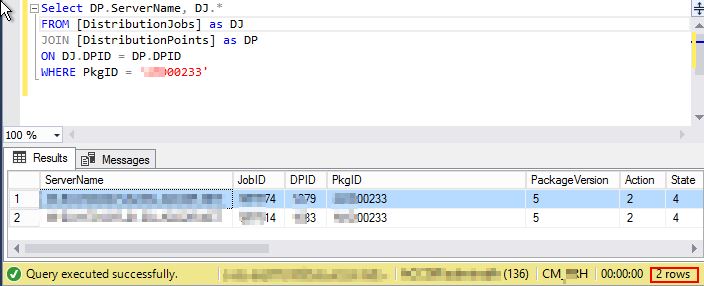
For information to see DP name use for example (here secondary XXH have 2 rows with same message):
Select DP.ServerName, DJ.*
From [DistributionJobs] as DJ
JOIN [DistributionPoints] as DP
ON DJ.DPID = DP.DPID
WHERE PkgID = 'PRI00233'


Then I found a Microsoft Article Understanding and Troubleshooting Content Distribution in Microsoft Configuration Manager https://support.microsoft.com/en-ae/help/4000401/content-distribution-in-mcm
in Useful query with a view
-- All Package/DPs in InProgress state for more than 3 days
SELECT distinct DPSD.DPName, DPSD.PackageID, SP.Name, DPSD.MessageState, DPSD.LastStatusTime, DPSD.SiteCode
FROM vSMS_DPStatusDetails DPSD
JOIN SMSPackages_All SP ON DPSD.PackageID = SP.PkgID
WHERE DPSD.LastStatusTime > DATEAdd(dd,-3,GETDate()) 
AND MessageState = 2 


and another interesting article with table https://blogs.technet.microsoft.com/umairkhan/2014/10/02/the-case-of-the-unexplained-the-package-gets-distributed-successfully-but-does-not-show-in-the-console/
select * from PkgServers_G where pkgid = 'PRI00233'
select * from ContentDistributionNotification where pkgid = 'PRI00233'
select * from ContentDistribution where pkgid = 'PRI00233'


So as you can see in my example table ContentDistributionNotification is OK

SELECT count(*)
FROM [ContentDistributionNotification]
WHERE PkgID = 'PRI00233'

 (No column name)
2315


Table ContentDistribution is OK too in my example


SELECT count(*)
FROM ContentDistribution
WHERE PkgID = 'PRI00233'

(No column name)
2315


Table PkgServers is OK too in my example

SELECT *
FROM PkgServers_G
WHERE PkgID = 'PRI00233'


Table PkgStatus has not same number BUT perhaps it is normal

SELECT count(*) FROM PkgStatus_G as PKGS
JOIN DistributionPoints as DP ON PKGS.PkgServer = DP.NALPath
WHERE ID = 'PRI00233'

(No column name)
2095--


GOOD CATCH
Try testing some Distribution Points  I see computer NOT in PkgStatus_G table are those with problems


For example we can see below %17% computer displayed in  PkgStatus_G and not %36%

here %36%  Distribution Point is 'in progress'

 here %17%  Distribution Point is 'Success'


So now I give you SQL Query to find ALL Distribution Points with this problem


-- Find Distribution Point 'in progress' with problems
-- by F.RICHARD 2019-01

-- Declare the variables to store the values returned by FETCH. 
DECLARE @PackageID varchar(50); 
DECLARE @tblResult TABLE (PackageID varchar(50), ServerName varchar(255), SiteCode varchar(10));

DECLARE PackageID_cursor CURSOR FOR 
    SELECT DISTINCT PackageId
    FROM vSMS_DPStatusDetails DPSD
    JOIN SMSPackages_All SP ON DPSD.PackageID = SP.PkgID
    WHERE 1=1
        AND DPSD.LastStatusTime < DATEAdd(dd,-3,GETDate())
        AND MessageState = 2


OPEN PackageID_cursor; 
FETCH NEXT FROM PackageID_cursor INTO @PackageID
WHILE @@FETCH_STATUS = 0 
BEGIN 
        print @PackageID


        -- create temp table after drop
        if(OBJECT_ID('tempdb..#TempPkgStatusServerName') Is Not Null)
        Begin
            Drop Table #TempPkgStatusServerName
        End
        CREATE TABLE #TempPkgStatusServerName
        (
            PkgServer Varchar(255)
            ,ServerName Varchar(255)
            ,PkgID varchar(50)
        );

        -- insert data
        INSERT INTO #TempPkgStatusServerName
        SELECT PkgServer
            ,ServerName =
            CASE
                WHEN CHARINDEX('\\', Pkgserver) > 0
                    THEN SUBSTRING(Pkgserver, CHARINDEX('\\', Pkgserver) + 2, CHARINDEX('"]', Pkgserver) - CHARINDEX('\\', Pkgserver) - 3 )
            ELSE
                Pkgserver
            END
            ,ID
        FROM PkgStatus
        WHERE 1=1
        AND ID = @PackageID

        INSERT @tblResult
                SELECT
                PackageID, DPSD.DPName, DPSD.SiteCode
                FROM vSMS_DPStatusDetails DPSD
                JOIN SMSPackages_All SP ON DPSD.PackageID = SP.PkgID
                WHERE 1=1
                    AND DPSD.LastStatusTime < DATEAdd(dd,-3,GETDate())
                    AND MessageState = 2
                    AND PackageID = @PackageID

                AND DPSD.DPName NOT IN
                (
                SELECT TMPTABLE.ServerName FROM #TempPkgStatusServerName as TMPTABLE
                )

        -- drop temp table
        Drop Table #TempPkgStatusServerName

        -- next data
        FETCH NEXT FROM PackageID_cursor INTO @PackageID
END

CLOSE PackageID_cursor;
DEALLOCATE PackageID_cursor;

SELECT PackageID, ServerName, SiteCode FROM @tblResult


And as I am really a nice guy I give the same in powershell
below

<#
.Synopsis
   SCCM_Get-Problematic-SMS_PackageStatus.ps1

.EXAMPLE
   .\SCCM_Get-Problematic-SMS_PackageStatus.ps1

.NOTES
  Version:        1.0
  Author:        Franck RICHARD
  Creation Date:    2019-01
  Purpose/Change:

#>
[cmdletbinding()]
Param(
     [String]$CM="mycm.mydomain.net"
    ,[String]$PrimarySiteCode="XXX"
)


# *************************

# For Time checking
$MeasureCommandBegin = Get-Date           


$strCurDir = Split-Path -parent $MyInvocation.MyCommand.Path
$strScriptName = $MyInvocation.MyCommand.Name
$date_for_file = Get-Date -format "yyyy-MM-dd_HHmmss"

$strSaveFile = $strCurDir + "\" + $date_for_file + "_" + $Hostname + "_" + $strScriptName.replace(".ps1",".csv")


# Get all packages
#
Write-Host "Get all Packages"
[HashTable] $hashPackageByPackageID = @{}
$arrSMS_PackageBaseclass = @(Get-WmiObject -Namespace "root\SMS\Site_$PrimarySiteCode" -Class SMS_PackageBaseclass -ComputerName $CM)
Foreach ($SMS_PackageBaseclass in $arrSMS_PackageBaseclass) { 
    if (!$hashPackageByPackageID.ContainsKey($SMS_PackageBaseclass.PackageID) ) {
        $hashPackageByPackageID[$($SMS_PackageBaseclass.PackageID)] = $SMS_PackageBaseclass
    }
}
Write-Host "Nb Package : $($hashPackageByPackageID.count)"


# Date Min = date LastStatusTime
#
$Nbdays = 3
$DateMin =  (Get-date).AddDays(-$Nbdays)


# Get all SMS_DPStatusDetails 'in progress'
#
Write-Host "Get all SMS_DPStatusDetails 'in progress' "
$Query = @"
SELECT * FROM SMS_DPStatusDetails as DPS
WHERE DPS.MessageState='2'
AND DPS.LastStatusTime <= '$DateMin' 
AND DPS.PackageID <> ''
"@
$arrSMS_DPStatusDetails = Get-WmiObject -Namespace "root\SMS\Site_$PrimarySiteCode"  -ComputerName $CM -Query $Query
Write-Host "Nb SMS_DPStatusDetails 'in progress' > $Nbdays days: $($arrSMS_DPStatusDetails.count)"


# Get Distinct PackageID 'in progress'
#
Write-Host "Get Distinct PackageID 'in progress' "
[HashTable] $hashDistinctPackageID = @{}
Foreach ($SMS_DPStatusDetails in $arrSMS_DPStatusDetails) { 
    if ($hashPackageByPackageID.ContainsKey($SMS_DPStatusDetails.PackageID) ) {           
        if (!$hashDistinctPackageID.ContainsKey($SMS_DPStatusDetails.PackageID) ) {
            $hashDistinctPackageID[$($SMS_DPStatusDetails.PackageID)] = 1       
        }
    }
}
Write-Host "Nb Distinct PackageID : $($hashDistinctPackageID.count)"


# For each PackageID  we get
#
[ARRAY] $arrInfos=@()
Foreach ($PackageID in $hashDistinctPackageID.Keys) {
        $SMS_PackageBaseclass = $hashPackageByPackageID[$($PackageID)]
        Write-Host "-> Check PackageID $PackageID 'in progress' ($($SMS_PackageBaseclass.Name))"


        # Get All SMS_PackageStatus for $PackageID
        #
        Write-Host "Get All SMS_PackageStatus for $($PackageID)  "
        [HashTable] $hashPackageIDByPkgServer = @{}
        #$Query = @"
        #SELECT * FROM SMS_PackageStatus WHERE PackageID='$PackageID'
        #"@
        #$Query = @"
        $Query = "SELECT PkgServer FROM SMS_PackageStatus WHERE PackageID='$PackageID'"
        #"@
        $arrSMS_PackageStatus = Get-WmiObject -Namespace "root\SMS\Site_$PrimarySiteCode"  -ComputerName $CM  -Query $Query
        Foreach ($SMS_PackageStatus in $arrSMS_PackageStatus) { 
            $ServerNALPath = $SMS_PackageStatus.PkgServer
            # ex: ["Display=\\MYCOMPUTER.mydom.net\"]MSWNET:["SMS_SITE=XXX"]\\MYCOMPUTER.mydom.net\
            # -> MYCOMPUTER.mydom.net
            $PkgServer = $ServerNALPath.Substring($ServerNALPath.LastIndexOf("]")+3).Trim("\")

            if (!$hashPackageIDByPkgServer.ContainsKey($PkgServer) ) {
                $hashPackageIDByPkgServer[$($PkgServer)] = 1        # $SMS_PackageStatus.PackageID
            }
        }

        # Check if exist in SMS_DPStatusDetails but NOT in SMS_PackageStatus
        #
        Write-Host "Check if exist in SMS_DPStatusDetails but NOT in SMS_PackageStatus for $($PackageID) "
        Foreach ($SMS_DPStatusDetails in $arrSMS_DPStatusDetails) { 
            if ($SMS_DPStatusDetails.PackageID -eq $PackageID) {
                if ($hashPackageByPackageID.ContainsKey($SMS_DPStatusDetails.PackageID) ) {
                    if (!$hashPackageIDByPkgServer.ContainsKey($SMS_DPStatusDetails.DPName) ) {
                        $custObj = New-Object -TypeName psobject
                        $custObj | Add-Member -MemberType NoteProperty -Name PackageID -Value $SMS_DPStatusDetails.PackageID
                        $custObj | Add-Member -MemberType NoteProperty -Name DistributionPoint -Value $SMS_DPStatusDetails.DPName
                        $custObj | Add-Member -MemberType NoteProperty -Name SiteCode -Value $SMS_DPStatusDetails.SiteCode

                        $arrInfos += $custObj
                    }
                }
            }
        }

}


Write-Host "Write file with all package informations"
$arrInfos | Export-Csv -NoType -Path $strSaveFile -Delimiter ";"
#$strContent | Out-File -FilePath  "$strSaveFile


$MeasureCommandEnd = Get-Date
$MeasureCommandTime = $MeasureCommandEnd - $MeasureCommandBegin
Write-host "Script Executing in $($MeasureCommandTime.Day) day(s) $($MeasureCommandTime.Hour) hour(s) $($MeasureCommandTime.Minutes) minute(s) $($MeasureCommandTime.Seconds) second(s) "


[EDIT 2019-01-21]

Please here SCCM_AddPackageToDP.ps1 (https://franckrichard.blogspot.com/2019/01/sccm-powershell-script-to-add-package.html) powershell solution to remove and add content and resolve this problem


.\SCCM_AddPackageToDP.ps1 -CM mycm.mydomain.net -PrimarySiteCode XXX -ForceToDeletePackageBeforeIfExist -ImportFilePath file_generated_by_SCCM_Get-Problematic-SMS_PackageStatus.csv


Thursday, September 13, 2018

SCCM - Distribution Point Console Performance Issues - Please make an Index


When you have a lot of Distribution Points you could have Console Performance Issues  (SCCM CB 1803, I don't know if solution below have been released since in SCCM CB future release)


For example, when I click on "Administration\Overview\Distribution Points" it takes 6-7 minutes to display 2900 Standard and Pulll Distribution Point


If we look into SMSProv.log file (in folder "Program Files\Microsoft Configuration Manager\Logs") when you click on "Distribution Points" you should have theses entries

Execute WQL  =Select * From SMS_DistributionPointInfo~
Execute SQL =select  all SMS_DistributionPointInfo.AddressScheduleEnabled,SMS_DistributionPointInfo.BindExcept,SMS_DistributionPointInfo.BindPolicy,SMS_DistributionPointInfo.BitsEnabled,SMS_DistributionPointInfo.CertificateType,SMS_DistributionPointInfo.Communication,SMS_DistributionPointInfo.Description,SMS_DistributionPointInfo.DPFlags,SMS_DistributionPointInfo.Drive,SMS_DistributionPointInfo.GroupCount,SMS_DistributionPointInfo.HasRelationship,SMS_DistributionPointInfo.HealthCheckEnabled,SMS_DistributionPointInfo.HealthCheckPriority,SMS_DistributionPointInfo.HealthCheckSchedule,SMS_DistributionPointInfo.ID,SMS_DistributionPointInfo.IdentityGUID,SMS_DistributionPointInfo.InternetFacing,SMS_DistributionPointInfo.IsActive,SMS_DistributionPointInfo.IsMulticast,SMS_DistributionPointInfo.IsPeerDP,SMS_DistributionPointInfo.IsProtected,SMS_DistributionPointInfo.IsPullDP,SMS_DistributionPointInfo.IsPXE,SMS_DistributionPointInfo.NALPath,SMS_DistributionPointInfo.Name,SMS_DistributionPointInfo.OperatingSystem,SMS_DistributionPointInfo.PreStagingAllowed,SMS_DistributionPointInfo.Priority,SMS_DistributionPointInfo.PXEPassword,SMS_DistributionPointInfo.RateLimitsEnabled,SMS_DistributionPointInfo.Region,SMS_DistributionPointInfo.ResourceType,SMS_DistributionPointInfo.ResponseDelay,SMS_DistributionPointInfo.SccmPXE,SMS_DistributionPointInfo.ServerName,SMS_DistributionPointInfo.ServiceType,SMS_DistributionPointInfo.ShareName,SMS_DistributionPointInfo.SiteCode,SMS_DistributionPointInfo.SiteName,SMS_DistributionPointInfo.SupportUnknownMachines,SMS_DistributionPointInfo.TransferRate,SMS_DistributionPointInfo.UdaSetting,SMS_DistributionPointInfo.Version from v_DistributionPointInfo AS SMS_DistributionPointInfo ~   


When I do same query on SQL Server Management Studio
SELECT * from v_DistributionPointInfo
->same result


So I make a Call To Microsoft (because I assume I will need an Index )

After query with  "Include Actual Execution Plan" we can see problem

here what view do...

And as you can see in a zoom below a lot of SC_SysResUse_Property seems take a lot of time (missing an Index...)


So using an new index (Thanks to Cyril C. from Microsoft), now same query in 5 sec (remember before it was 7-8min)
As usual, it is NOT permit to modify SQL directly to do not lose your Microsoft support. So please contact Microsoft if you need to resolve this problem.


/****** Object:  Index [NonClusteredIndex-20180827-163036]    Script Date: 27/08/2018 16:42:14 ******/
CREATE NONCLUSTERED INDEX [NonClusteredIndex-20180827-163036] ON [dbo].[SC_SysResUse_Property]
(
              [SysResUseID] ASC,
              [Value3] ASC
)WITH (PAD_INDEX = OFF, STATISTICS_NORECOMPUTE = OFF, SORT_IN_TEMPDB = OFF, DROP_EXISTING = OFF, ONLINE = OFF, ALLOW_ROW_LOCKS = ON, ALLOW_PAGE_LOCKS = ON) ON [PRIMARY]
GO

USE [CM_AHD]
GO

SET ANSI_PADDING ON
GO

/****** Object:  Index [NonClusteredIndex-20180827-161513]    Script Date: 27/08/2018 16:42:00 ******/
CREATE NONCLUSTERED INDEX [NonClusteredIndex-20180827-161513] ON [dbo].[SC_SysResUse_Property]
(
              [SysResUseID] ASC
)
INCLUDE (          [Value3],
              [Name],
              [Value1],
              [Value2]) WITH (PAD_INDEX = OFF, STATISTICS_NORECOMPUTE = OFF, SORT_IN_TEMPDB = OFF, DROP_EXISTING = OFF, ONLINE = OFF, ALLOW_ROW_LOCKS = ON, ALLOW_PAGE_LOCKS = ON) ON [PRIMARY]
GO